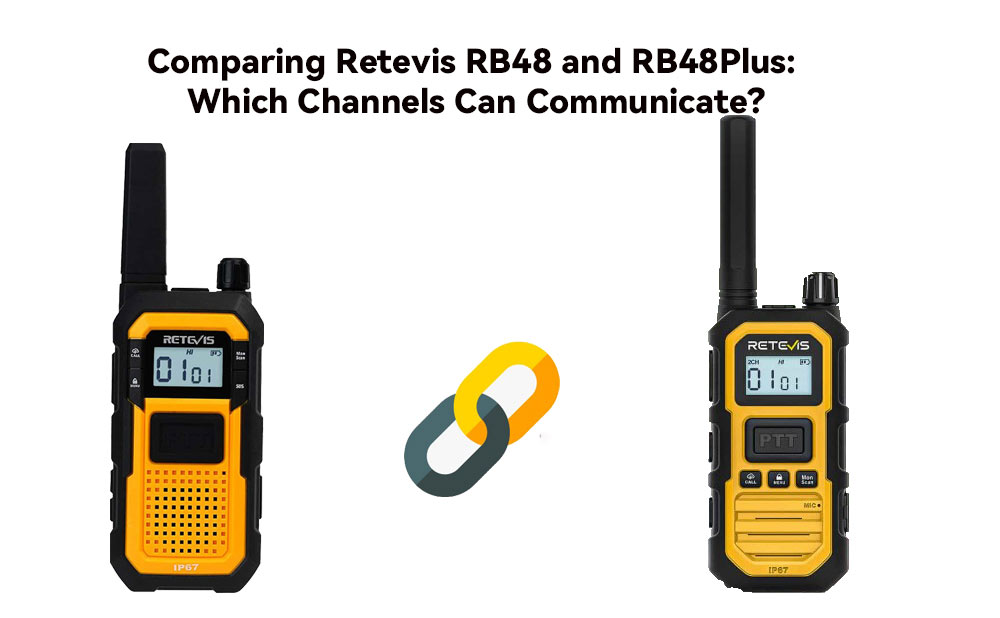
When using different models of walkie-talkies, matching the channel settings is essential for reliable communication. The Retevis RB48 and Retevis RB48 Plus are both popular two-way radios, but are their channels compatible?
In this guide, we compare the Retevis walkie talkie radios channel frequencies, CTCSS/DCS settings, and factory-default configurations to identify which channels the RB48 and RB48 Plus can use together.
The RB48 and RB48 Plus can communicate when both radios use the same:
A matching frequency alone is not always enough. CTCSS/DCS settings filter incoming signals based on the programmed tone or code. If these settings differ, two radios may not hear each other even when they operate on the same frequency.
The compatibility analysis is based on the factory-default channel configurations provided in the official Retevis product documentation. We compared the RX/TX frequencies and CTCSS/DCS settings for each channel on the Retevis RB48 and RB48 Plus.
A channel is considered fully compatible when the frequency and CTCSS/DCS settings match. If the frequency matches but the CTCSS/DCS code differs, the channel requires adjustment before communication.
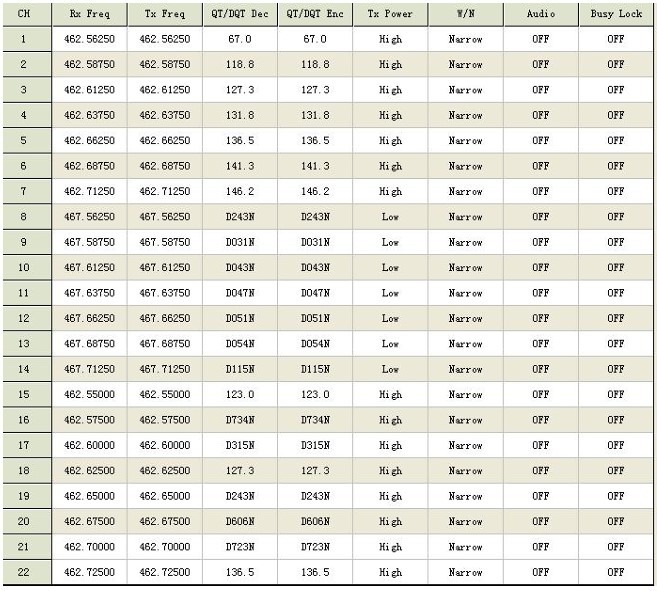
The RB48 factory-default channel configuration shows the operating frequency and corresponding CTCSS/DCS settings for each channel.
RB48 Frequency Chart
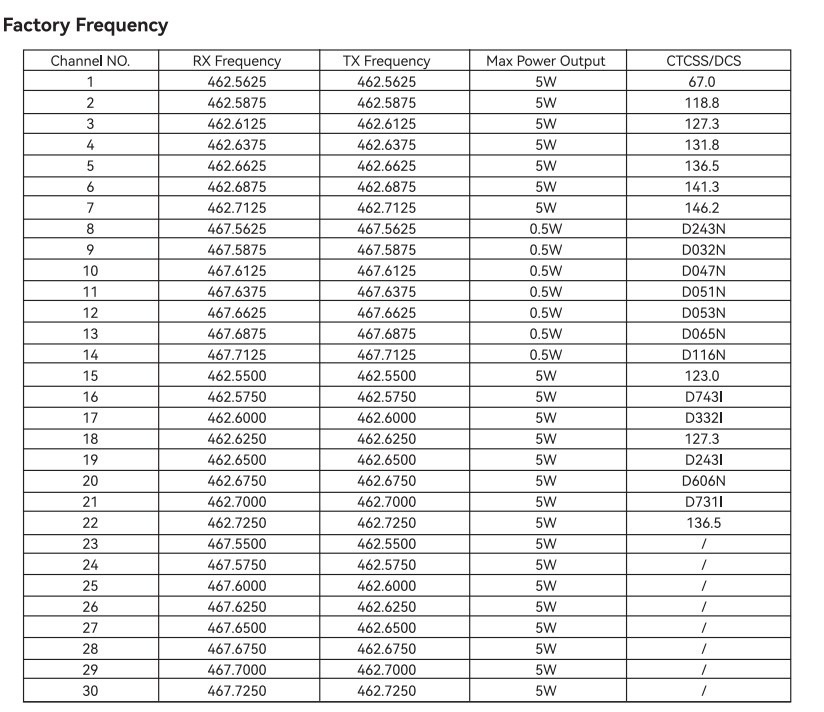
The RB48 Plus uses a similar channel configuration, but some frequency or encoding settings differ from the RB48.
RB48 Plus Frequency Chart
The following table summarizes the factory-default configurations of the two radios:
|
Channels |
Frequency |
CTCSS/DCS |
Compatibility |
|
1–8 |
Match |
Match |
✅ Fully compatible |
|
9–13 |
Match |
Different |
⚠️ Requires adjustment |
|
14–22 |
Match |
Match |
✅ Fully compatible |
|
23–30 |
Different settings |
Different/varies |
❌ Not compatible by default |
This table reflects the factory-default configurations. Actual compatibility depends on the settings programmed into each individual radio.
Channels 1–8 use matching RX/TX frequencies and CTCSS/DCS settings on the RB48 and RB48 Plus.
You can use these channels for direct communication between the two models without additional programming.
Channels 14–22 also have matching frequency and CTCSS/DCS configurations.
These channels provide another group of factory-compatible options when using RB48 walkie talkies and RB48 Plus radios together.
On channels 9–13, the RB48 and RB48 Plus use the same frequency but different CTCSS/DCS settings.
Because the codes do not match, the radios may not hear each other's transmissions under the default configuration.
To use these channels together, manually set the CTCSS/DCS code on both radios to the same value.
Note: CTCSS/DCS is sometimes called a “privacy code,” but it does not encrypt the transmission or provide true privacy. It primarily controls which signals open the radio's squelch.
Channels 23–30 have differences between the RB48 and RB48 Plus in their factory configurations, including frequency or encoding settings.
Therefore, these channels should not be considered directly compatible without reprogramming the radios.
When checking whether two Retevis radios can communicate, follow these steps:
Do not rely on the channel number alone. The same channel number can represent different programmed frequencies or codes on different radio models.
No. Retevis walkie-talkies are not automatically compatible simply because they are made by the same brand. Compatibility depends on factors such as frequency band, RX/TX frequency, CTCSS/DCS settings, and radio configuration.
Yes. The Retevis RB48 and RB48 Plus can communicate on channels with matching frequency and CTCSS/DCS settings. By default, channels 1–8 and 14–22 are compatible.
The Retevis RB48 Plus manual provides detailed information about channel frequencies, CTCSS/DCS settings, and radio operation. Refer to the documentation for the specific radio version before changing channel parameters.
The RB48 Pro has its own channel configuration, so compatibility should be determined from its specific frequency and CTCSS/DCS settings rather than assuming that all RB48-series radios use identical configurations.
A Retevis frequency list or radio frequency chart shows the programmed frequency and related settings for each channel. It can help determine whether two radios can communicate and which settings need to be adjusted.
The Retevis RB48 and RB48 Plus can communicate directly on channels 1–8 and 14–22 using their factory-default settings. Channels 9–13 require matching CTCSS/DCS settings, while channels 23–30 are not compatible by default.
By checking the Retevis channel frequency list, RX/TX frequencies, and CTCSS/DCS settings, users can quickly determine whether different Retevis radios are configured for reliable communication.
No data Yet










 Google
 Amazon